Print one QR code. Run an entire campaign behind it.
Create QR codes, short links, and smart destinations that guide people to the right next step. Route each scan by device, language, location, or time of day, and see what happens next.
The Free plan needs no card.
A real Sprykit QR code, made for you just now.
Update it later. The code you printed keeps working.
Table 1
Marlow & Grove
Scan for our menu
- This Sprykit QR code is printed on the Table 1 table tent at Marlow & Grove. Scan it with your phone: it opens the café’s current menu.
- A dynamic URL, form, or app-download code points to a redirect you control. Change the destination anytime without reprinting.
- Menus, link pages, business cards, PDFs, galleries, and videos live at a stable address. Update the content; the printed code never changes.
- We never break your printed codes. Downgrading never disables an existing platform-served QR code, link, or page; past your plan’s monthly traffic allowance, pages carry a Sprykit banner.
Contact-card, WiFi, event, email, SMS, WhatsApp, phone, location, and text codes carry their content inside the code, so they can’t change after printing.
Marlow & Grove is a Sprykit demo workspace.
The difference between printing a QR code and running a campaign.
Create the code.
Pick one of 20 content types: URL, contact card, WiFi, PDF, video, review page, menu, form, and more. A scannability check keeps a designed code reliable.
Export PNG, SVG, or a print-ready PDF sized to the physical piece.
Point it somewhere.
A landing page, a digital menu, a link page, a form, a digital business card, or any URL. PDFs, galleries, and videos get a hosted page at a stable short URL, no website needed.
Route each scan by device, language, location, or time of day. See smart routing below.
Print it once.
Print it, post it, send it. Share it wherever your customers already see you.
Where a code can’t go, a branded short link on sps.to or your own domain can, with UTM parameters and in-app-browser detection for social traffic.
See what happened.
See what people scan, click, submit, and respond to.
Scans by day, device, browser, and country. Source attribution tells a QR scan from a link click.
One code, many experiences.
Route each scan by device, OS, browser, language, country, region, or local-time schedule. Split any destination into weighted A/B variants and let Sprykit declare the winner, only at 95% statistical confidence.
- Rules
- Send each visitor to a different destination by device, OS, browser, language (base-language aware, so “es” matches “es-MX”), country, region, or a local-time schedule with weekday windows.
- A/B testing
- Split any tier of the journey across variants by percentage. A two-tailed test at 95% confidence, with at least 100 visitors per variant, tells you “winner”, “keep testing”, or “not enough data”.
- Attribution
- Every routing decision is attributed to the rule that fired. Conversions, dwell time, and device and geo breakdowns per destination.
- Insights
- Plain-language insights, and a flag when performance swings against the prior period.
- Reporting
- A weekly email digest with period-over-period deltas and a CSV attached. Full journey reports export as CSV or PDF.
See journeys use cases, or compare every plan to see which include smart routing.
Every scan, measured.
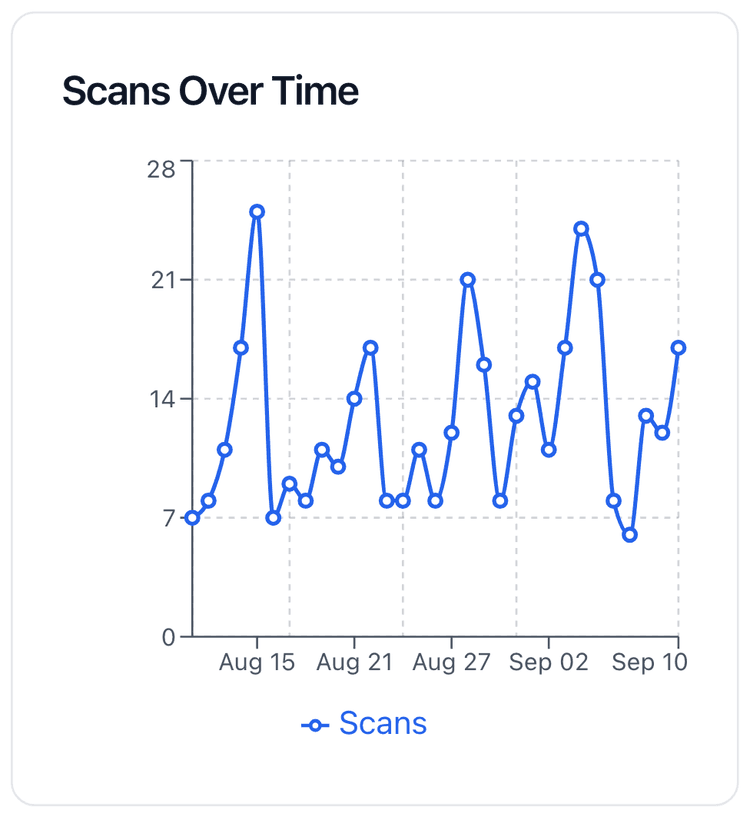
- Every scan of a dynamic code is counted: by day, by device, browser, and country, and one at a time with the city it came from.
- Bot detection counts real humans, not crawlers.
- One analytics hub for QR codes, landing pages, link pages, menus, forms, and short URLs, each with an activity drill-down. How far back you can look depends on your plan.
From scan to conversion.
Create your first Sprykit QR code in minutes.
The Free plan needs no card.