Forms that finish the job
Lead capture, registrations, feedback, applications, onboarding — with conditional logic, spam protection, and analytics on every field. And because it's Sprykit, any QR code or short link can point straight at one.
The Free plan needs no card.
Point a printed code at a form. The follow-up is built in.
Marlow & Grove
Join the loyalty club
- This Sprykit QR code is printed on the card beside the register at Marlow & Grove. Scan it with your phone: it opens the café’s loyalty signup form.
- The form asks for five things: first name, email, mobile number, birthday month, and what to hear about. Only the first two are required.
- When someone submits, they see a thank-you screen to show at the counter, and the café gets an email with the response.
- A form code is a dynamic code. Point the printed card at a different form later without reprinting it.
- Where a card can’t go, a short link can: the same form is sps.to/AoOSzS1M (opens in a new tab) in the café’s email footer and on Instagram.
Marlow & Grove is a Sprykit demo workspace.
Built for the whole workflow
From the first question to the spreadsheet it lands in.
18 field types
Short and long text, email, phone, URL, number, date/time, single and multiple choice, dropdowns, linear scale, rating, file upload — plus layout blocks like sections and page breaks.
Conditional logic
Show or hide fields based on earlier answers, so every respondent only sees the questions that apply to them.
Google Sheets sync
Submissions land in a spreadsheet automatically — no exports, no copy-paste.
Webhooks & notifications
Pipe submissions anywhere and get notified the moment one arrives.
Per-field analytics
See completion and drop-off field by field, so you know exactly where respondents give up.
Spam protection
Rate limiting and bot filtering keep your submission list human.
Every submission, counted.
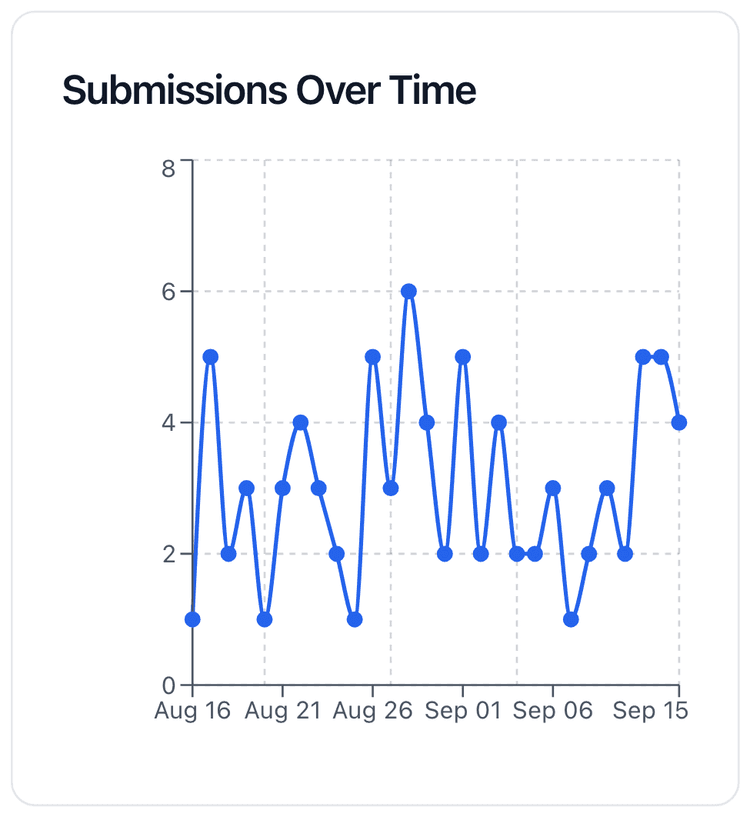
- Every form is measured: views and submissions by day, by device, and by country, and completion field by field.
- Submissions land in a Google Sheet automatically, fire a webhook, or export as CSV.
- One analytics hub for QR codes, landing pages, link pages, menus, forms, and short URLs, each with an activity drill-down. How far back you can look depends on your plan.
What teams build with Forms
Lead capture forms
Capture qualified leads with branded forms that convert on any device.
Event registration forms
Manage event RSVPs, attendee data, and reminders in one flow.
Customer feedback forms
Collect feedback fast and turn customer insights into action.
Job application forms
Streamline hiring with forms that collect the right candidate data.
Client onboarding forms
Collect onboarding details and kick off projects faster.
Follow where Forms is going
Get an email when new Forms capabilities ship — no noise, just launches.
Launch your first form today
Build it in minutes, share it with a link or a QR code, and watch submissions arrive with analytics attached.
The Free plan needs no card.